Tuesday, September 28, 2010

Un-boxing Pictures of My Kindle 3

Apologies for the Delay, My Kindle 3 Arrived on the 30th of August, and had not got a chance to upload the un-boxing Pictures.

Following are the Pictures, of the Box, and it's accessories, as well as Side By Side Pictures with my Ipad to show you what the new kindle size is. Nimish Dubey also got his Kindle 3 yesterday and has uploaded a Video of the un-boxing, as well as a Side by Side picture of how the Kindle 3 Looks against Kindle 2.

The box with it's tear to open packaging. Amazon has made the packing much better over the years

Yes I tore of the Address Label, I don't want you to know my Address :)

Yes I tore of the Address Label, I don't want you to know my Address :)

And the Kindle 3. Remember the Display that you see on the Kindle is in the power off state, much like a screen saver, and not a sticker. Though there is a Shiny Plastic on top of it, that I just could not wait to get rid of.


The Kindle Manual, it is a small recycled paper printed manual on how to go ahead and start using the Kindle. The Great part is that the Kindle is already programmed for your account, so if you have books in your account you can download them the minute you get online using Wifi or 3G


Amazon also includes a small USB Charger (No you can't charge any other device with it, as it supplies very minimal current), and a long USB Cable


The Kindle3 with the iPad


The Kindle 3 with the iPad with Screen on


The Kindle3 is much faster than the Kindle2. Though I chose the wifi only model (so as to avoid buying books on the fly all the time) and I think that makes a much nicer deal. The Unit landed me at about Rs. 10,200 in India after paying all the Duties and Taxes and took about 3 Days after Amazon informed me that it is shipped from their Side.

The support for PDF's is much better and you can now easily look at the PDF's. The Browser is a bit faster and nicer, but I will really never want to use the browser on the Kindle to look at the Internet.

I setup my account@kindle.com and also setup a Feedreader / Read it Later Account, that sends the web pages to my Kindle. Though I am primarily using it to read PDF manuals for our devices and other stuff that I need, I have also downloaded and bought a couple of books.

Though by sending a PDF with the Word Convert in the Subject line to your Kindle address converts the text in the PDF for you to be able to read on the Kindle, it does destroy most of the nuances of Text Layouts, hence I will not prefer to use it for PDF's also.

I will still prefer the Kindle more of a Book and Text file reader where there is piles of documents to be read. Since I have the iPad and the Kindle on the same account, I can read part of the documents on the iPad and some of them on the kindle.

I must say the new refresh rate of the e-ink screen is much better, and the screen is more and more like paper now, though you can still tell this is e-ink, but my 4 year old nephew, handed My kindle back to me (a person who does not stay away from gadgets), saying I had given him a Dummy, and not the original device.

So What's Happening with Sony Ericsson


Interesting Meeting over a Nice Lunch on 24/September with the Sony Ericsson Team. Anurag Kontu (Head of Marketing) and Tammy Teo (APAC PR) travelled down to Delhi to meet a few bloggers, yes and your's truly was invited. Though the purpose of the lunch was to see how Sony Ericsson and Bloggers could work together, it was nice fun meeting Clinton Jeff, Abhishek Bhatnagar, and Javed Anwar

Though all of us came out of the meeting learning more on Sony Plans to ensure that devices are available on all Operating Systems, and there is a universal approach, though as of Today there has been a statement issued by Sony Ericssons' Chief Technology Officer Jan Uddenfeldt that there will be no new Symbian Phones, this was not shared with us at the Lunch.

Anurag and I had an brilliant conversation about the Green Heart by Sony Ericsson, and over the next few days I am going to try to get Anurag to speak to me over a Chat and share his thoughts about going green, and how Sony Ericsson is making a Difference.

What was surprising to learn was that the Green Heart Phone, Hazel, is actually capturing 30% of the Market between the 6K to 12K Priced Handsets, though it is not selling because it's a Green Heart Phone, interesting conversation that is, but because of features and prices.

Anurag also shared that Sony has now standardized on the Mini USB Port as the charger port, so no more of those different charges amongst their lines. Another interesting fact shared by Anurag was that Sony Ericsson has now spent a lot of time and money on the new line of chargers, that actually power off (Zero energy consumption) after your phone has finished charging, or is not connected with the Charger, thus contributing more to their Go Green Efforts.

Though No one committed to the Sony Ericsson / Sony Tablet, but we did have a good conversation around it. Also the conversation turned around to why Phone Manufacturers charge a premium and or are priced higher than the competition and what defines phone pricing.

We came out of the meeting, make a few new friends, but without a scoop what is happening. Though we have a commitment from Sony Ericsson that they will spend more time sharing Phone Instruments for reviews, so soon you should be seeing' some stuff here.

I was pretty busy catching up with Anurag, that I did not click any pictures, but here is one that Clinton Jeff, took while I was speaking to Anurag.

From Left to Right (Anurag Kontu, Tammy Teo, Vasundhra Mudgil)


We did get to play with Anurag's own phone the Xperia X10 running Android 2.1 (Well he has an advantage working for Sony, though confirmed dates of when the Phones will come preloaded with 2.1 was still not available), Also available were X10 Mini, and the X8, which was looking pretty nice with it's gradient blue back.

Monday, September 13, 2010

A 5 Year Old Journey comes to an End

Back in 2005, I was working on starting a Magazine, Was wondering, whether to call it Dr. Gadget, G-Spot, or Just something, and met a Wonderful person call Gautam Chikermane, who gave me a column with the then, Indian Express Estates. I did not know I had the writers spirit in me, over the last 5 years, I have worked with great people in the Indian Express Team, and some of them have moved on to setup larger ventures, and have actually got into serious technology writing. Though I still debate, do you need to be a tech, a geek like me to write about technology or just a gadget / technology fan.

Over the Past Years, my column was shifted from the Express Estates (Saturday), to the Express Money (Monday), and then to the Main News Paper on Sunday, and eventually in a pull out called Eye, which came as a supplement to the Indian Express, the wonderful part was that readers, who gave their love and adulation, and made sure I was writing for the masses, stuck along, your 1000+ mails for each of my articles that came out each week, love and affection for me, and my family has made me connect with so many people across the country.

Yesterday, on the 12th of September 2010, was an end to a Journey, Indian express is revamping, the EYE pull out into an A4 Sized Magazine, similar to other news papers, and hence now has a space crunch, I have now been asked to stop contributing to the Indian express. While I will still write for the Open Magazine, I am still unsure if I will get a News Paper Assignment.

I hope, that I will find the time and direction to stay connected with all of you, with a tear in my eye, I bid adieu to my team at the Indian Express, and my Fans, who will not get to know this, as their only source of information was the news paper.

G

What if you don’t have Ping


Apple made some great announcements on September 1, among them the iTunes 10. Though everyone was quick to download the new version, it suddenly dawned while the user interface improvements and a new tricks were there, the new social network for music, called Ping, was missing from the iTunes in India, as it needs access to the iTunes stores. Those of us who got access to iTunes stores had access to Ping, but with mixed feelings for those who didn’t.

For those of you wondering if you need to upgrade and download the latest edition, you don’t have to rush. Right now the only two features available in India are the simpler Sync, again more of a user interface improvement than anything else, and a feature called AirPlay which allows you to play any media in your library to enabled devices, which are yet to hit Indian markets.

If you want your friends to know what music you are listening to, who your favourite artiste is and what you think of their latest album, there are simpler ways of doing this, even if you do not have Ping.


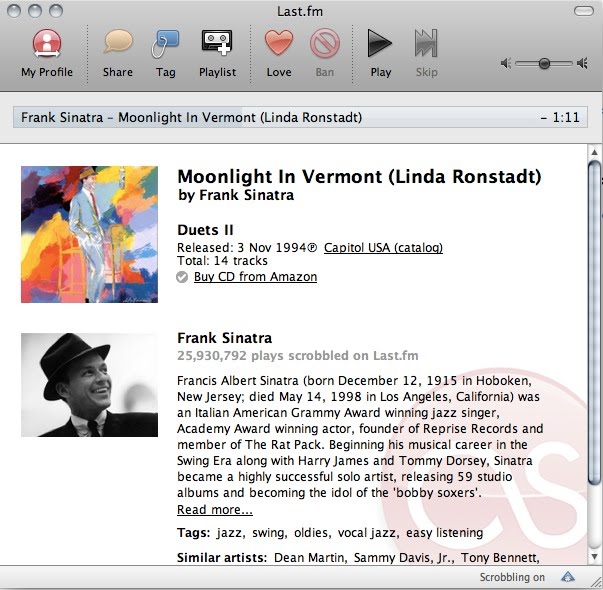
To do this, you can go to www.last.fm and open a free account. The application does what it likes to call scrobbling and listen into what you are listening to and what kind of listening preferences you have. Depending on this it will do one of the following:

* Show you more information on the track that you are listening to, and the album, and let you buy the album from Amazon.com or other online portals the CDs is available on.

* Show you similar artistes.

* Show the top listeners on last.fm who have a similar taste as yours, and help you make friends.

* Let you listen in to tracks from similar artistes in your social neighbourhood.

* Mark your songs as loved or banned, so that they don’t get played again.

Sometimes artistes and companies work with last.fm to offer you free downloads of music, and if you hit their portal, you will also get an option to download a few mp3s.


I tried artistes varying from Frank Sinatra, A R Rahman, Shreya Ghoshal to Nusrat Fateh Ali Khan and Alam Lohar and it was not only able to pull out the right information, but even suggest that since I loved Alam Lohar's music, I would like Kartar Ramla and Sukhwant Kaur, adding another dimension to my music.

So if you are worried about not getting Ping, get yourself a free account with last.fm, download the scrobbler, and enjoy music, like never before.

--
The above article appeared in the Indian Express, on Sunday 12th September 2010

Saturday, September 11, 2010

Games on the television


A FEW days back, while browsing through the channels on my TV, I saw my Tata Sky DTH was offering Active Games. I was tempted to try out Ninja Mahajong, especially since the games were free till August 31. Soon, I was browsing through the rules of Ninja Mahajong, which looked similar to any other Mahajong game, except for the tiles which had Ninja warriors on them.

A few minutes later, the game started making sense. But there were issues. To start with, the Ninja warriors were not very clear and I had to really concentrate to make out the difference between the tiles. I checked it out on a couple of other TVs and found that the tiles were not great when it came to design, and the whole charade of Ninja’s fighting with each other every time you selected the right combination was a bit of an overkill.I tried the cricket game next. But I don’t understand much of the game and am not really interested in it. There was this guy throwing balls at me, and I was not able to hit even one of them. But my nephew managed pretty well.

The next game we tried out was the Kombat Fighter. It took me a couple of minutes to get the hang of it and get going. The only reason I could play this game was because I can type without looking at the keyboard, and most of us can use the TV remote without looking at it. But this game was not as much fun, you need to focus on the numbers that scroll on top of the screen, and press them. It must be fun for someone younger, but the game, from my point of view, was very average.

So, why am I writing this review. For one, this is a great way of getting some games on your TV, though only time will tell how much Tata Sky will charge for them. However, I would have loved more basic games, such as Pacman or maybe even car racing, rather than having games that slow me down. If I really want fast games, I will buy a dedicated gaming machine.

Overall, I found the whole experience slow, because of two reasons – the games have to download and take about five minutes to start up; the TV remote control is not really a controller for a game.

But things could get interesting as Tata Sky has plans to launch new games each week. Still, all this depends on whether the services are free. Once Tata Sky decides to charge, we will really need to see if it’s all the worth it.
--
The Above article appeared in the Indian Express, on Sunday September 05, 2010

Why I still love the kindle


ELECTRONIC notepads and tablet PCs have been here for ages now. But then Kindle came along and changed everything. It let you carry your books wherever you went, without adding to your luggage. It also let you order new books online, without having to go to a store. But then Kindle was not perfect. Many people hated its black and white screen though it was the gadget's best feature, making it easy on the eyes and using up very little of the battery.

Then came the Apple iPad which has a colour screen and lets you do a lot more with the books, especially with those for kids. But, in India, you still have to depend on a friend abroad to get you one, and then the battery does not go on and on like the Kindle.

The market became interesting when Kindle took the fight to Apple by releasing an app for the iPad, which meant you could buy books from the Kindle store and read them on the iPad. And the books were trademark Kindle, all in black and white. There are other apps that let you read magazines and books in colour.

But I still love the Kindle as it seldom runs out of juice and you can read books even under the sun, thanks to the high-contrast screen. The enormous collection of books, newspapers and magazines and the fact that they can be download just about anywhere still make it the best e-reader.

No doubt the iPad can do more thanks to its high-resolution, 9.7-inch LED-backlit IPS display which also lets you play games and read books. The other great thing about iPad is that it also lets me create documents, which you cannot do on Kindle. However, it is not good for reading lengthy books due to the strain the screen can put on your eyes. You can get over this problem by buying a matt-finish screenguard, but reading is still not as fun as the Kindle. Yeah, iPad is cool, but I think I will still stick to the Kindle for now.

--
The above article appeared in the Indian Express, on Sunday August 29, 2010


We are all big consumers of electronics, from multiple cellphones to our big-screen television sets to the little computer that runs our car. But all of them have a life, at the end of which it becomes garbage, waste that goes into landfills, and then pollutes the earth.

Rapid changes in technology which makes things obsolete faster, coupled with falling prices of new appliances and gadgets have increased the problem of electronic waste. These days, over a 20-year adult life cycle, we go through approximately five phones, two television sets, a couple of DVD players, MP3 players, stereo systems, computers, laptops and so on, thus adding to the electronic waste around us.

A good thing about India is that here nothing much is wasted. When your computer actually becomes slow for you, it moves down the ladder. Some people just trade it with an organisation that does a buy-back, or sell it to a scrap dealer who will either resell it or break it down to see what can be reused gainfully.

Still, there is a lot of electronic waste being generated in our large cities, with some reports indicating that this is set to grow by 500 per cent in the next 10 years. The Central Pollution Control Board (CPCB) estimates that we produced about 1.47 lakh metric tonne of e-waste in 2005, a figure that will grow to 8.0 lakh metric tonne by 2012.

While the government is setting up standards for large companies and producers to handle e-waste, we as individuals also need to do something about it. This is where a new breed of entrepreneurs called e-waste recyclers has entered the scene. E-waste recycling, or e-cycling, is not new and has been done by a lot of companies themselves or outsourced to recyclers who would take the plastic parts out of electronic goods and recycle it. Some even refurbish the entire device and sell it cheaply to an under privileged person.

So, the next time you find an old unwanted electronic item in your house give recyclers like simsrecycling.com, e-waste.in, ecoreco.com and attero.in a call. They will delete the data on your hard drives before they recycle, and will ask for your explicit permission to do so. If not, make sure you do a double format of all your hard disks before you dispose of your electronic waste. A delete and simple format can’t protect someone from recovering data and misusing it.

Like the scrap dealer, some of them might also pay your some money, but remember it’s not the monetary gain but the environmental gain that matter more.
--
The above article appeared in the Indian Express, on Sunday August 08, 2010

Switch off, fly safe


Every time I fly, I see people put their phones under their thighs, look in the other direction and try to act deaf, all because the cabin crew has announced that all electronic devices, including their precious cellphones, have to be switched off for the duration of the flight. Recently, a man sitting next to me refused to do so. The flight was delayed and he was still on the phone.

Reprimanded a couple of times by the airhostess, the man decided to put the phone on airplane mode. The crew explained that he would have to switch it off completely. But the man countered that his calls were important, especially as the flight was late. As the debate turned into a heated argument, I tried to explain why it is important to switch off the phone in an airplane. But our friend was not convinced.

That episode made me decide that it was time I explained how a small mobile phone can cause havoc in an airplane. Though electronic equipment on airplanes is designed to ignore interference, there have been several instances when their navigational equipment showed errors. This was linked to a cell phone being used on board, though scientifically there are difficulties in proving that the gadget alone was the cause of the errors. But, I guess, it is better to be safe than sorry.

All electronic equipment, especially our phones, laptop computers and BlackBerrys, have a communication engine that not only listens for radio frequency signals, but also transmits them. Similarly, our iPods have Wi-Fi, while many other gadgets have Bluetooth. The airplane mode switches off the radio, but there are still chances that the device may send out signals, and that’s why we have to be cautious.

The aircraft uses sensitive navigational equipment, similar to a GPS in the car. The equipment depends on communication from the airfield below as well as satellites above to know where it is going. As all this communication is on radio frequencies, disruption or disturbance can make the plane deviate from its track. This can have disastrous effects, especially during poor visibility when the pilots are almost completely dependent on electronic navigation. Things can become even more complicated if the interference happens during take-off or landing.

The Government of India’s Civil Aviation Department circular dated September 12, 2003, categorically says that passengers can only use mobile phones as long as the aircraft is on the ground with its doors open. But, the phone cannot be used when the aircraft is refueling, when pre-flight functions are on, or when aircraft communication is happening. In no condition should the phones be used after the doors are closed, and this is a legal requirement, not a request.

But, why switch off an old Walkman or CD player which have no transmitters? These devices emit electro-magnetic radiation, which at times can exceed the prescribed limits and interfere with the onboard equipment like the auto-pilot.

The latest planes have a shield to protect their navigation equipment and some carriers have started allowing passengers to use cell phones mid-air. But till those planes come to India, it better to just switch off your phone and relax, maybe even chat up your fellow passengers and make some friends.
--
The Above article appeared in the Indian Express, on Sunday August 01, 2010

Coping with Information overdose


I read and browse a lot, especially when I am travelling. This means I have access to a lot of information, from newspapers to online articles to paper cuttings. I would love to capture all this information at one place, so that I can access it when and where I want, just like I do with my Internet bookmarks.

There are many tools that let you do this, but I think Spring Pad does it better than the others. Spring Pad is a free tool for iPhones and Android phones, and it also works on an iPad. Sadly, Symbian and Java Phones will have to wait to use the app, while others can use limited features through the mobile web browser. There is an alternate tool called Evernote, which you can use across all platforms, but it is still a bit behind Spring Pad.

So how do you use Spring Pad? Let’s say, you are walking on the road and come across an advertisement that has a number, an email address and some other information you would like to capture. The more conventional way would be to grab a piece of paper and pen to write down the relevant information, or maybe just photograph the ad. But with Spring Pad, you can photograph it, tag it and save it on your phone. When you come back home, log on to the website, and you can retrieve that information, even synchronise it with other phones.


If you are looking for a recipe, search for it online and press the Spring Pad button on your browser. The app then stores the recipe, the cooking time, and the ingredients you will need, so that when you are out shopping, you can check Spring Pad on the phone and see what all you have to buy.

That's not all. The Spring Pad can also integrate with your Gmail, Flickr, Facebook and Twitter accounts and create contacts from these accounts, get calendar events from your mail and send alerts to you on your Twitter account.

Just in case you hit upon an idea and can’t access the app for some reason, you can just email it to Spring Pad and it becomes a note, which you can mark or tag later. Spring Pad also allows you to share your information with friends. You can choose what to share, and they can also share information with you. You can also create notebooks from the apps section or add more notebooks such as your household budget calculator or manage your wine collection.
The possibilities are endless, and remember, Spring Pad is still in Beta.

Sure, there is nothing like a small diary and a pen. But then, this is so much better. So what are you waiting for, get yourself a free account at springpadit.com.

--
The Above article appeared in the Indian Express on Sunday 25th July 2010

The all-rounder


The new Core i3, i5 and i7 processors from Intel are the rage now. About a fortnight back, the guys at Intel got in touch with me to review a laptop running on the Core i5 processor at 2.27 GHz and see how fast it works and what it could do. They arranged to send me an Acer Aspire 5740 Machine for the review. So here is my take on the powerful new i5 processor from Intel and the Acer Aspire 5740 which runs on it.


The Aspire 5740 has been available with an i3 Processor for sometime now. Acer has recently announced machines with i5 and i7 processors, out of which the former is already available with dealers. While the look, feel and the weight of laptops generally stays the same, you have the option of choosing an entry-level or a high-speed processor depending on your needs.

The i5 processor is designed to perform and work with you for a long time. Supporting technologies such as Turbo Boost, that allows you to speed up the processor when there is a need, and balance power and speed, helps laptops compromise battery time for performance. Similarly, it also helps the laptop work on low power when you are just browsing or checking email. The built-in Hyper Threading technology allows you to multi-task seamlessly. If you are into high-end gaming or have to run complicated calculations, the Hyper Threading engine will make all the difference. An average user might not need this, but will still see benefits of the processor, like while watching a HD movie.

The first thing you notice about this 15.6” laptop is its size. It is, in fact, a desktop replacement and not really a machine you would wanted to lug around all day.

The keyboard is well-designed and the keys laid out in a very user-friendly way. A dedicated number pad on the right, and a 103 keyboard with the multi-gesture touchpad that supports circular motion scrolling, pinch action zoom and page flip was great to work on. In fact, I am tempted to say this is the first laptop keyboard I’ve liked after my favourite MacBook.

The blue power button reminded me of the USS Star Ship Enterprise from Star Trek and I loved the glow it gives when you are working in the dark. Dedicated buttons to turn off Wi-Fi, Bluetooth, backup keys and volume keys add to the use of the machine. The machine has Dolby certified speakers which can be a great experience if you are playing a game or just enjoying a movie. The machine came preloaded with 3 GB of RAM and a 320 GB Hard Disk, and playing games on it was a breeze, except for maybe the graphics performance.

Sadly, the test unit sent to me did not have an OS installed. However, I installed Ubuntu Linux as well as Windows 7, and both worked perfectly well.

Though the machine is large and runs a fast processor, I was surprised to get a battery time of 2.5 hours plus on all my tests. The large screen also entailed a better signal pick on my Wi-Fi, which was nice as I end up using 10” machines most of the time. The screen supports a maximum of 1366x768 pixel resolution and has a high brightness rating. With an aspect ratio of 16:9 and 8ms response time with a 60% colour gamut reproduction, the screen can give most LCD TVs a run for their money.
The HDMI Port worked out of the box. The built-in microphone was great too while the webcam is optimised for low-light conditions. But trust me, you do not want to do a Skype video call with the lights off, it just does not work.

Like its peers, the Aspire 5740 has a multi-card reader and four USB 2.0 ports. I would have preferred an USB 3.0 or an eSata port, instead of the archaic modem port. There is the usual RJ45 port for wired Ethernet while the wireless does not support 802.11a.

Overall the most attractive part of the machine was its huge size, a brilliant keyboard, great screen and good sound reproduction. The machine comes with a one-year warranty, and is a great option if you are looking for an all- rounder that has the size, agility and great looks. Price Rs 44,000.

--
The Above article appeared in the Indian Express, on Sunday 18th July 2010

Friday, September 10, 2010

Is It time to Switch to HD?

Suddenly everyone is going HD. Sun TV was the first to take the plunge, though with limited availability and just a handful of channels, but now all satellite TV providers seem to have joined the bandwagon. Some weeks back, when asked why that hadn’t launched HD services, guys at Airtel had told me that by the time of the World Cup finals everyone would have switched over. And this is coming true with Dish TV, TataSky and Airtel all announcing the availability of their HD DTH boxes.

What is HD video?
I know this is a basic question and most of you will have your own set of answers. Well, technically High Definition video is any video system of higher resolution than standard definition. HD video is any image between 1280x720 pixels (also called 720p, or HD Ready) and 1920x1080 pixels (1080p, HD). Remember, the higher the pixels, the better the definition. So it is essential that your TV supports 1080 pixels for it to show real HD quality.

So what do the various HD services offer?


TataSky: The service offers 1080i, 16:9 aspect ratio and 5.1 Surround Sound. The box costs Rs 2,599 and has an installation fee of Rs 1,000 which is waived off for now, plus there are additional charges of Rs 30 per month to get the channels in HD. If you are an existing TataSky customer, you will get the High Definition Channels — ESPN, Star Sports, Discovery HD World, National Geographic — free for the first 12 months.


Airtel Digital TV HD: The service has 1080i and 16:9 aspect ratio. But going one up on TataSky, the Airtel box offers 7.1 Dolby Digital Plus Surround Sound, if you have a home theater capable of reproducing the signal. The box is priced at Rs 2,940, but only offers ESPN and Star Sports in High Definition. Other channels are expected to be added soon. You must also remember that though the channels are in HD, not all broadcasts are hi-definition – as of now the Wimbeldon and the FIFA World Cup are in hi-definition.


DishTruHD: Rs 2,990 plus installation charges of Rs 200 + taxes. Customers are required to buy a Platinum pack with the HD Box which will put you back by Rs 325 per month, whether you like it or not. You will also have to pay for an HD Pack of Rs 100 per month, taking your monthly bill to Rs 425 + taxes, making it the costliest service in the market. The service is 1080i with 16:9 Aspect Ratio, but there is no clarity on the sound output of the box. Though Zee has two of its own channels — Zee Cinema HD and Zee TV HD — in addition to what the others are offering, not all content on these channels are in HD.


Big TV HD: Big TV is the only one offering an HD DVR box right now at Rs 7,490. The box offers 1080i, 16:9 aspect ratio, and 200 hours of standard definition storage on its 160 GB built-in hard disk. Only National Geographic HD is available on the HD Box for now.


Sun Direct HD: The first one off the block has announced a new package where you get the box with two-month subscription for Rs 2,940. They have SunTV and Colours in HD along with what others are offering. The Box offers 1080i, 16:9 aspect pictures, and 5.1 Stereo Sound.

The scenario is confusing with all the players jumping in to cash in on the football craze with not much additional content. The market is just evolving and it would be better to wait a few weeks to see how the players mature. Also wait for the HD recorders from the other players before upgrading. Things should look up as more channels start making and beaming content in HD. Till then, hold your guns.

--
The above article appeared in the Indian Express, on Sunday 10th July 2010

Lost? Just dial a friend


I am writing this article from Mysore and am pretty much lost. I don’t know the language, and since I did not bring my car here, I don’t have my GPS handy. Though my Blackberry has an inbuilt GPS, it is useless because Airtel’s GPS software does not work that well. I wanted to fire up my laptop to check the Web for directions, but the battery was nearly drained out. I wish I had a friend who I could call up and ask for directions.

And then I remembered, I do have a friend, Map My India’s new Dial 62 feature. All you have to do is dial 011-62626262 and a patient concierge at the Map My India office will help you with the directions. They will ask for landmarks in the vicinity to pinpoint your location and then send you directions via SMS. They can also email you the information you are looking for, be it something trivial like an ATM or petrol pump.

The service is still in the beta stage and shaping up. Rohan Verma of Map My India, however, commits that the full launch in about four weeks will include a 24x7 call centre and local numbers for more cities. As of now, the service is limited to between 8 am and 7 pm on all days, and with just the Delhi number.

Dial 62 also has local city information. But this service is now available only in Delhi. So the next time a friend calls you for directions, you can just ask him to Dial 62 instead of taking him on conducted tour to the restaurant he is looking for.
I wish operators tie up with the service and offer a short code that one can dial into, irrespective of the city one is in, to seek directions.

Though Dial 62 in a way is one of the first to offer you directions on the phone, and bridges the digital divide in a brilliant manner, another service worth mentioning is Routeguru. This service is also available through SMS and the Internet, though limited to Delhi as of now. The service from both companies is free. But you have to pay for the call charges in case of Dial 62 and the SMS charges in case of Routeguru.

The biggest problem on Indian roads, especially unfamiliar ones, is the frequent changes in names of roads, lack of proper signages and political parties pasting their posters on road signs. That’s why things can’t can’t get simpler than this. I know I can always roll down the window and ask, but then, I am an Indian man and it is beyond me to roll down the window and ask for anything. This is why it always helps to have a friend, just a phone call away.

--
The above article appeared in the Indian Express, on Sunday July 04, 2010

Getting back the Pulse


Not one to be left behind, Yahoo does a Buzz with Pulse


The Internet started out as a place that was disconnected, with information scattered everywhere. To get to where you wanted, emerged a world of portals followed by the search engines. Companies such as Yahoo and AOL excelled at it, but over the years many of the giants faded into oblivion or changed their business models. While Google stuck to search and started building a whole lot of other things, Yahoo was still busy playing a hybrid between a portal and a search engine.

But that was before people started sharing information on their own using Twitter, Facebook, Flickr and every other social media platform available. This took the Internet user to different websites and too many pages, meaning there were too little eyeballs on the portals. This was a problem that needed a solution. Google came up with Buzz, but it got caught in privacy issues. Now, Yahoo is trying its bit with Pulse.

Before the dawn of Google and Facebook, there was a time when Yahoo Messenger meant the world to everyone. But when social networking took away it winds, Yahoo was left with no option but to transform itself. Some time back, Yahoo profiles reincarnated itself as Yahoo Pulse with some very attractive changes. Though still at a preliminary stage, Pulse seems like it has the ability to define the next wave of online computing and information sharing. To some users, Pulse — http://pulse.yahoo.com — will seem like a bit of Twitter, Facebook, Orkut and Yahoo Messenger rolled into one; a bit intimidating at first. But this is where I think it gets its edge.

As digital cameras have become cheaper, people want to share their pictures online. Some are very personal, and you will only want to share them with a few select friends. Others are of cats, dogs and mountains that you would love to show the world. This is where the integrated Flickr album in Pulse comes to your help.

Then there is the integrated blog engine which does not limit your expressions to 160 characters like Twitter or a few lines like Facebook. On Pulse, you can write a long blog post and then, if needed, automatically share it among your connections.

Like Facebook, Pulse too gives you applications and games. You just have to click the application tab on the left and add games or applications, and there is already a good range to choose from.

As of now, Pulse only integrates with Facebook and Flickr. I would have loved to see a Twitter plug-in as well as the ability to login and fetch my mail from Gmail and Hotmail, but then these things take time. For those of you who are looking for a Facebook replacement, Pulse is not what you want. But for those of you looking for an extension to sharing information with your online friends, Pulse presents an attractive and user-friendly option.

And thankfully, Yahoo has handled the privacy issue very clearly. Your information can be slotted under three definitions — No one, Friends and Everyone. Select ‘no one’ and then absolutely no one will be able to see your thoughts and ideas, ‘friends’ mean only those in your contact list can read your posts and the ‘everyone’ option means it’s for anyone to see.
So if you were looking for a one-stop networking solution, retaining Yahoo as your home page, look no further.

--
The above article appeared in the Indian Express, on Sunday 27th June 2010

A link for your TV - Review of the Iomega’s ScreenPlay TV Link, Director Edition


Finally, something that lets you watch YouTube on your television


It has been a painful, and expensive, journey to get YouTube to work on my television. I have toyed with many a product before discovering the Iomega’s ScreenPlay TV Link, Director Edition. Though not perfect, I seem to have found what I was looking for.
I bought my DVD player a couple of years back and it does not have USB ports. Now, with YouTube, my great collection of online radio stations and brilliant programmes on the TV, my DVD Player has just been collecting dirt. However, I still get DivX files, especially from some independent filmmaker friends, in pen drives. And this is why USB ports have become important.

Thankfully, the TV Link has lots of them – two in front and one at the back. Even if you plug in the Iomega wireless adapter on one, there are two left for pen drives and external hard drives. With the hard disk plugged in, you can share it across your home network through wireless. Though you will not be able to define which folders to share, it will still give you access to your media drive. The best part is that you can straightaway programme torrent files to download to this hard disk using the TV Link, without a PC coming in the way. In case you have a file share server or a home network drive, you can access the media from that drive directly.

The TV Link also has HDMI and RCA connectors, and you have the option of changing the latter from RGP to YUV input, thus enabling versatility. Also at the back of the unit is an SPDIF connector that lets you hook up high quality 5.1 audio to your home theater equipment.
The codecs supported by the TV Link generally plays every movie file that you throw at it. Though clips I shot with my old mobile phone in the 3gp format did not play; avi, divx and other movies formats worked out of the box. The unit supports Dolby Digital Encoding, WAV, WMA, MPEG1/2/4 (AVI/xVID), DivX and JPEG as formats. The output is a full 1080 p, so for old TV sets you will have to programme it to use a 720 p, 4:3 output.
The slim form factor means that you can carry it around while on holiday and hook it up to the television in your hotel room and watch the movies, listen to music, or see pictures that you have stored on your external hard disk.

Problems: I would have loved to see built-in wireless connectivity. Though you can buy a dongle from iomega to make the unit wireless, most of the dealers were not aware of the cost or availability of a replacement device. I would also have loved to have support for a wireless keyboard so that I could easily type what I wanted to search for in YouTube, though the remote that shipped with the unit works perfectly fine. You can login to your YouTube account directly from the unit, but for someone like me who uses a complex password, this can be a tedious task.

The TV Link heats up quite a bit and should be used in a well-ventilated place. The unit is very sleek and slim and one may tend to shove it into a crevice just about the size of the unit. But make sure the ventilation is good, especially when you want it to download torrents when you are not around.

Over all, at Rs 7,300, I think this is a box that is priced right. I would have loved to have a memory card reader slot built into it, but then you can’t get everything. The box includes the unit, a remote control, a power adapter, an HDMI 1.3 cable, a video cable and a quick start guide.

--
The Above article appeared in the Indian Express, on Sunday 20th June 2010

Sunday, June 20, 2010

Make Your Own Robot


Making your own robot might be expensive, but not that tough

Ever since man made the first machine, he has dreamt of making a robot that will relieve him of his daily chores. Industrial robots have been around for a while, so have robotic vacuum cleaners, grass cutters and toys that know how to negotiate obstacles. But a robot that will really be at par with humans seems to be still some years away. This week, I will tell you the basics about robots and maybe inspire you to build one of your own.

The heart: Microprocessor and the project board


The project board is a printed circuit board (PCB) that comes with many cavities for the different processors. It is just like any other video game, but since this is hardcore electronics, a mistake means that you will land up with a burnt unit that the radio repair mechanic down the road will not be able to fix. After this your will need to choose a processor and get some chips and cables to hook all this up.

The mechanics: Servo motors


A servo is what makes the robot move. Like other motors, this too has some wires coming out and a gear on one end to connect the other mechanical parts with it. The difference here is that the servo understands movement in angles and if you want to turn the leg or the hand of your robot forward by 10 degrees you can send it a command through your programme to the microprocessor to change the angle. The more powerful the servo, the harder the work your robot will be able to do. If you plan to build a robot that can climb stairs, not only will you need the servo to lift the weight of the whole mechanics, but also to move in half a degree steps.

The senses: Sensors


Like a human can touch, feel, see, hear and smell, a robot too will need some kind of feedback of the environment around it. In case you want it to climb stairs, you will need to provide sensors in the foot that let it know that you are now touching the surface. In case you want it to turn its head the moment it hears a sound or sees a light, you will need to put in sound or light sensors. You can even put in ultrasonic sensors so that the robot can detect if it is going to bump into something and react accordingly. But all this will make the whole system more complex and you may end up needing more than one processor – maybe one each to handle the senses and mechanics.

Control: Wireless or wired


The cool toy robots started with a wired remote control that could make it jump or walk and then switched on to wireless. With the technology available now, you can choose to integrate a Wi-fi chip to command the robot over the home wireless, or a GSM chip so that you can just send it an SMS to get things done.

Bells and whistles

Remember R2D2 from Wall-E? Well, they all had their own bells and whistles, quite literally. An LED glowing on top of the head showing it is receiving programme to a horn that blows every time it has an obstacle in front, the possibilities are endless.

Programming
This is the difficult part. After the mechanics and the electronics are all in place, you need to be able to write a programme and then teach your robot to follow it. In fact, some robot kit manufacturers give you a simulator where you can actually test out the programme on your computer before you try it out on your expensive robot.
All this might seem a bit overwhelming, but if you have a knack for electronics or mechanics and love building things you will get over the fear. For those who don’t want to build from scratch, there are kits such as Robonova (hitecrobotics.com) or the Johnny 5 (lynxmotion.com), both with dealers in India. The kits will set you back a big amount of money, but then who said robots came cheap.

--
The above article appeared in the Indian Express, on Sunday 13th June 2010

Tuesday, June 08, 2010

Our private Facebook lives


At times the Internet can be a bit dangerous. A search of your name can reveal a lot of information, including your Permanent Account Number, your election ID number and even your full address... a jackpot for identity thieves. This is all someone needs to access your banking information and leave you broke.
They can take a loan, buy a car, or even file fraudulent tax returns in your name. If arrested, they could even give your name and address to the police and fail to show up for a court hearing. In such a case the warrant for arrest will be issued in your name, all because you did not bother about privacy on websites such as Facebook.


A few days back, Verisign caught someone selling personal information of people from Facebook. Accounts that had 10 or less friends were priced at $25 per 1,000 accounts and those with more than 10 friends at $45 for a 1,000. The seller claimed to have access to 1.5 million Facebook accounts.

Facebook has given us some wonderful moments, connecting us with long lost friends and relatives. But it also puts up a lot of personal information about you on the Net. Though for you and me privacy may not be a priority, it is something that you should always keep a tab on.

A great way to start is search your name on Google. If you were to run a search for my name “Gagandeep S. Sapra” — the quotes are important to restrict the search to these words only — you get about 19,000 results out of which some may disclose my email ID and even my office telephone numbers. But my personal details, like my Facebook page, do not turn up in a simple search, thanks to my privacy settings.

So what are these privacy settings? Facebook defines privacy settings into three broad categories — Friends, Friends of Friends and Everyone. What you have to be careful about is the last one, as this is the default for a lot of the settings and can expose your thoughts, your personal information and your relationships to the whole world.
In the last few days Facebook has been receiving a lot of flak from people across the globe, prompting them to simplify their privacy settings. Since it is still not all that simple, here is what you must do to stay safe online.


FRIEND LISTS: Since my parents are also on Facebook, I really don’t want them to see every post I make. We all have a different style of talking to our friends and our family, and this is why friend lists are important. If you have not classified your friends as yet, it is time you did. It could be a simple distribution into friends and family, or a complicated one like school friends, college friends, work friends and family. The good thing here is that you can add the same person to more than one list, and at the time of posting choose which group of friends can see this post. So if you are posting a video you want the world to see, you can select everyone, but if there is something you will like to restrict to your closest buddies just click of the friend list of your choice. To configure your friend lists, click Friends from your left hand menu and select Create a List. The next step is to ensure who can comment or write a status on your wall, as long as you set this up to your friend lists, it is okay, but if it is set to anyone, anyone can search for you, reach your wall and write anything on it.

KEEP YOUR FRIEND LISTS PRIVATE: We all want to show off that we are friends with so many people. The other day, I met someone who mentioned he knew ‘Barrack O Bama’ on Facebook. Well, it’s great to know that you are friends with the ‘American President’, but it is also your responsibility to secure your friends. Hence, it is a good policy to turn off your friends’ visibility to others. Though this may not seem too much right away, you don’t want your friends to get unsolicited marketing email/spam just because they are your friends.

MAKE CONTACT INFORMATION PRIVATE: We all want to put our phone numbers and email addresses online so that our friends can contact us easily. But making this information public is also taking a big risk. The settings has now been simplified into three broad categories — Email & IM, Birthday and Phone Numbers and Address. Since I don’t really want everyone to run a search on me and find out where I live, or when my Birthday is, or what my phone number is, it is best to select the option Friends. If you choose to select the Everyone option, anyone who searches for you will be able to see this information.

RELATIONSHIP STATUS: It is funny to see a status update saying Friend X is now married to Friend Z when they have been married for over a decade and just updated their profile. It is good to share this information with your friends and business contacts, but there will be a flurry of congratulatory messages every time you update the status. So it is better to get rid of the settings for this and make sure this is displayed only to you and your loved ones, not the whole world.

BASIC DIRECTORY INFORMATION: So, who should be able to search for you on Facebook? Go to your directory information settings and make sure you set up options that control what amount of information comes up in a search, who can really search for you or send you a message, or see your interests, your work and educational backgrounds.

A recent report by eweek shows the leak of accounts and there availability on the black market, in case you are interested in the report, you can read it online at the eweek website (Please note this report is not authored by me)

--
The above article appeared in the Indian Express, on Sunday 6th June 2010

One car, many screens - Review Dish TV Mobile TV


With traffic jams getting longer by the day, we are slowly getting to a point where commuters in the metros spend up to three hours every day getting to office and back. As you tend to leave home early and return late, most of us end up missing news and other television programmes.

A DVR can record your favorite soap operas so that you can catch up when you finally reach home, but then you can also have a television in the car. While this is not an advisable option if you are planning to watch TV and drive, it makes more sense if you have an SUV or MUV with a chauffeur driving you about.
And now with Dish TV launching its Personal TV, everyone in the vehicle has the option of watching the channel of their choice.


However, priced at Rs 2,45,000 for the startup edition, this is not exactly cheap. The latest version uses a new antenna from Ray Sat and has four screens with individual DTH boxes that help you stream different channels on each screen.
To give you privacy, all TV sets are coupled with wired headphones which can be upgraded to a wireless model at an additional cost. The basic screens come from NECVOX and you can choose a better screen or larger screen if you want.

A single wire downlinks from the RaySat dish antenna to a dish controller in the back of your car which is powered by the car battery — but be careful, for if you run this system with the engine shut, the battery will drain in about an hour. The trunk will also hold the four receivers and Dish TV claims the wiring is done professionally by their trained dealers — but the wiring in the demo car didn’t seem all that professional. Each TV also comes with its individual remote control, just make sure you point it at the right screen.

Sadly, Dish TV hasn’t been able to do a really professional job. They use the same Zenega DTH set top box they use for home which means you will need to change the card after a few months and that won’t be all that easy. They are also not clear how the service will be outside the big cities. As of now, everything looks like a ‘jugaad’, especially the additional infra-red receivers that jut out from under the screens.

The single TV version costs you roughly Rs 1,90,000, while the four-screen variants start at Rs 2,45,000. The annual subscription of about Rs 10,000 is included in the first payment. Since television channels are broadcast on a DTH system using horizontal and vertical polarisation, not all channels are available at one go. You can get up to 162 channels if you put a single TV system in your car, but for multiple TVs, you will get only 81 “popular channels”.
--
The above review appeared in the Indian Express, on Sunday May 30, 2010

Creative Commons License
Writings by Gagandeep Singh Sapra by Gagandeep Singh Sapra is licensed under a Creative Commons Attribution 2.5 India License.
Based on a work at www.thebiggeek.com | www.gagandeepsapra.com | www.g-spot.in.
Permissions beyond the scope of this license may be available at www.thebiggeek.com.