Showing posts with label Tech Toys I Live With. Show all posts

Friday, October 01, 2010

Unboxing and First Preview of Olympus PEN EPL1 Micro 4/3rds Camera

Finally after waiting an year I got my EPL1 Micro 4/3rds from Olympus, and here is the first set of Unboxing Pictures and Videos, and a Couple of shots. I am now going to play with this over the next few days while on Holiday in Himachal, and will comment what my thoughts are in a few days. I bought the 2 Lens Kit, which ships with a Micro 4/3rds 14-42 mm f: 3.5 to 5.6 ED Lens (The Lens has A Diameter of 40.5 mm and it was very difficult to find a UV Lens for it, but I managed to get an Indian Companies lens from Sonia). The Other Lens is a Standard DSLR Lens Which is a 40-150 mm f 4 to 5.6 ED Lens again, but uses a Four Thirds Adapter MMF-2 to fit onto the camera.

The Color Options available in the EPL 1 are a Black Body, a White and Beige Body and a Light Gold Body. The 14-42 mm lens is either a Silver or a Black Lens, while the 40-150 lens is a Black colored Lens.

Olympus has also given away the XD Card slot for an SD and SDHC Card Slot in the Camera. The camera features a 4/3 type MOS sensor that has a total of 13.1 million pixels, but you get a 12.3 million effective pixels in use. making this a 12MP camera for people who want to know the ratings. It also has a Video Mode using Motion JPEG and can support upto 30 frames per second in either 1280x720 or 640x380 pixel mode. Though I will not be using the PEN to shoot videos as I have the Zi8 for that, but in case you want to look at a one stop solution this camera does offer it.

The Other Alternative for me was the Canon G11 which I was seriouslly interested in, especially since it had an optical view finder, a Tilting LCD Screen, and Dedicated Dials for EV and ISO Settings, but when I compared the Photo Quality and also the option of getting it with a 14 mm to 150 mm lens range (albeit on two lenses), compared to a 24-140 in a single lens and then waiting for Canon to get you lenses, I opted for the PEN.

The PEN though is very similar to the original PEN that olympus has had for years, and a few people thought I was buying / shooting with a Film camera when testing this out in the office.

Anyway, for the EVF you can buy an option Electronic View Finder, and also you can buy an additional Flash. The Flash in the EPL1 can be used for distances upto 10 feet (compared to 7 feet in the G11), and I love the feature that for you to be able to use the flash, you have to manually release it (Thank God, I hate auto flash features). A Major missing feature which can be annoying at times is the Orientation Detector, this camera works very similar to a Film camera, where there is no orientation detector, so purists may love it, but that's a feature every one seems to be using these days.

I was also interested in checking out the Sony NEX Cameras, but as per the PR for Sony these would launch only towards the End of November. The Alpha Series has not had serious buyers in India for Sony, so was unsure if they will really ever get the NEX Series here. The Next Alternative was the GF1 from Panasonic, but there was no place possible to try it out or to actually feel what they felt in hand.

Though compared to the Price that you pay for an Olympus (Rs. 30,000 for Single Lens Kit, and Rs. 39,990 for Dual Lens Kit), and a G11 (Rs. 30,000), you pay a much lower Price for some of the feature rich DSLR's, but the portability and the format on the 4/3rds is appealing to people in case you want to move up from a point and shoot and don't want to carry bulk around with you or if you already have a DSLR and want a similar quality on a smaller camera.

In case you want to know more on what a Micro 4/3rds System is all about, check out this wikipedia article.

Anyway, enough said on the specs, in case you want to check out more of this camera look at the Olympus Website. Now the Few Shots that I have taken for trying it out and some videos of un-boxing it. Remember the photos of the Un-boxing were taken using my Zi8.

The screen on the Camera is unable to handle very bright sunlight environments, and you tend to get blinded out. Though I am still playing around with options, but this means soon I will need to pick up an Electronic View Finder for this Camera.

Click on the pictures to get high resolution files.


The Collection of Solar Plants I have in my Office Window

A close up of one of the Solar Plants

A very old Thermometer and Hygrometer from Russia that I have lying in my Window

At Q'BA nu.delhi, a place I have always loved

The Bar at Q'BA nu.delhi

The Chandelier at Q'BA nu.delhi


Tuesday, September 28, 2010

Un-boxing Pictures of My Kindle 3

Apologies for the Delay, My Kindle 3 Arrived on the 30th of August, and had not got a chance to upload the un-boxing Pictures.

Following are the Pictures, of the Box, and it's accessories, as well as Side By Side Pictures with my Ipad to show you what the new kindle size is. Nimish Dubey also got his Kindle 3 yesterday and has uploaded a Video of the un-boxing, as well as a Side by Side picture of how the Kindle 3 Looks against Kindle 2.

The box with it's tear to open packaging. Amazon has made the packing much better over the years

Yes I tore of the Address Label, I don't want you to know my Address :)

Yes I tore of the Address Label, I don't want you to know my Address :)

And the Kindle 3. Remember the Display that you see on the Kindle is in the power off state, much like a screen saver, and not a sticker. Though there is a Shiny Plastic on top of it, that I just could not wait to get rid of.


The Kindle Manual, it is a small recycled paper printed manual on how to go ahead and start using the Kindle. The Great part is that the Kindle is already programmed for your account, so if you have books in your account you can download them the minute you get online using Wifi or 3G


Amazon also includes a small USB Charger (No you can't charge any other device with it, as it supplies very minimal current), and a long USB Cable


The Kindle3 with the iPad


The Kindle 3 with the iPad with Screen on


The Kindle3 is much faster than the Kindle2. Though I chose the wifi only model (so as to avoid buying books on the fly all the time) and I think that makes a much nicer deal. The Unit landed me at about Rs. 10,200 in India after paying all the Duties and Taxes and took about 3 Days after Amazon informed me that it is shipped from their Side.

The support for PDF's is much better and you can now easily look at the PDF's. The Browser is a bit faster and nicer, but I will really never want to use the browser on the Kindle to look at the Internet.

I setup my account@kindle.com and also setup a Feedreader / Read it Later Account, that sends the web pages to my Kindle. Though I am primarily using it to read PDF manuals for our devices and other stuff that I need, I have also downloaded and bought a couple of books.

Though by sending a PDF with the Word Convert in the Subject line to your Kindle address converts the text in the PDF for you to be able to read on the Kindle, it does destroy most of the nuances of Text Layouts, hence I will not prefer to use it for PDF's also.

I will still prefer the Kindle more of a Book and Text file reader where there is piles of documents to be read. Since I have the iPad and the Kindle on the same account, I can read part of the documents on the iPad and some of them on the kindle.

I must say the new refresh rate of the e-ink screen is much better, and the screen is more and more like paper now, though you can still tell this is e-ink, but my 4 year old nephew, handed My kindle back to me (a person who does not stay away from gadgets), saying I had given him a Dummy, and not the original device.

Tuesday, May 18, 2010

Small Wonder - Review Kodak Zi8


You can always shoot videos with your still camera or get yourself a good video camera, but the form factors of the latter seem too outdated at times and videos from my still camera are shoddy at best. So getting good video quality, if possible HD, in a form factor that works for me, is important and the Kodak Zi8, with its fit-in-short-pocket size and easy to use features, fits the bill perfectly.
The Zi8 is small and measures just 2.4 by 4.5 inches; it is about an inch thick and weighs 138 grams. Bt it still offers five shooting modes — 1080p (1920 by 1080), 720p (1280 by 720) at 60 frame per second, 720p at 30 fps, WVGA (848 by 480) and still photos (5.3 megapixels at a 16:9 aspect ratio). Video is captured in H.264 format and audio is recorded at 48kHz. Plus, it comes with both telephoto and macro mode.

Also included are an external microphone port in case you want to hook up a mic to the person you are interviewing. You can also run the camera on external power for long durations, though on battery and shooting high definition videos gave me 2.5 hours shoot time. In case of a long shoot, it is better to plug the camera into the electrical socket.

Apart from the form factor, the Zi8's image quality is brilliant and image stabilisation one of the best in the industry. For many this might not mean much, but when you shoot a movie with a camera in your hand, the slight jerks can cause a lot of disturbance, and the Zi8 negates these easily. But I would leave the still camera of the Zi8 for a time when you have no better options available.

The 2.5-inch LCD is bright and sharp, and you can adjust its brightness in three steps. But the shiny black plastic in which the body is finished is a fingerprint magnet and very scratch prone, so I suggest you carry it in a cover at all times. The dealer gave me a 4GB SD card with the camera, but I think you should go for an 8GB SDHC card which will give you approximately 120 minutes of HD video recording.

The built-in USB plug is a wonderful feature and you don't need to carry a memory card reader at all times. You can connect the Zi8 to either a Mac or a Windows machine and it is detected as an external disk. If you are a Windows user, the ArcSoft Media Impression Software can be installed from the camera, but Mac users will need to use something like iMovie to edit videos.

In case you are trying to make videos for YouTube, I suggest you stick to the compact 720p/30 fps or WVGA formats as your best results. For home movies, it is better to use 1080p/30fps. The HDMI and AV cables come bundled with the camera. In playback mode, you can go from slow motion to about 16x speed, skipping to part you want to watch.

But the Zi8 is not a super fast camera and I did have some issues shooting indoors. The indoor shots have come out well, but the videos shot in daylight look as if they were taken with a professional camera. The built-in microphone is not all that great and you might have to plug in a better mic for good audio quality. A feature which I absolutely hate is the red light next to the lens, which tells the person you are shooting. Though I understand that this will prevent privacy invasion, it becomes annoying for the person you are shooting.

Moreover, you can't change settings while recording a movie. If you try to do this, the camera stops recording and you have to start a new file. The icon that shows the battery level some how goes off the screen when recording begins, though, thankfully, they reappear when it has just 20 minutes of juice to spare. However, the built-in four-way toggle and the buttons were easy to use.

Creative's Vado and the Cisco Flip are good competitors, but Zi8 delivers similar features at a great price point of Rs 10,999, making it one of the best pocket camcorders I have reviewed till date. The greatest quality of the Zi8 is that you can concentrate on the shooting, while the camera handles everything else.

--
The above review appeared in the Indian Express, on Sunday 16th May 2010

Monday, November 23, 2009

Lessons Not Learnt from 26/11 - How to Hack a wireless

Security is the utmost importance for all our companies. Recently CNN IBN Asked me to become their Citizen Journalist and show easy it is to hack into a wireless network. Attached is the URL to the Show that was aired on CNN IBN on Saturday 21/November. Do let me know your comments.

Tuesday, November 03, 2009

Unleashing the Snow Leopard


How do you make something that is good better? Well, you can ask Apple, for they have made this a habit. So it was no surprise when Steve Jobs and his bunch of innovators once again changed the landscape of Operating Systems with their latest Snow Leopard Apple OS X 10.6. Though a minor version upgrade that costs a lot—Rs 1,800 for the single-user pack and Rs 2,900 for the five-PC family pack—compared to Windows it is a small price to pay for great features.

To start with, Apple has managed to shrink the total installed size of the operating system by 6GB, which makes it not only smaller but also more efficient. Not a big deal for regular users, but this has made other software manufacturers think in terms of reducing their footprint.

However, the single biggest add-on is the 64bit compatibility. The earlier version of OSX was not compatible and thus unable to optimally use modern hardware. Native 64 bit compatibility assures that all processor cores can be used simultaneously ensuring better performance. It also allows for bigger RAM, 32GB instead of 4—you will still need to see if your hardware can support it though.

Apple applications like Safari, iChat, iCal and Mail are now 64bit, making everything from shutdown to backups faster. The new Apple Mail client, Calendar and Address Book can now work directly with Microsoft Exchange without installing Outlook. The 64bit has also made the new Safari 4 on Snow Leopard the fastest browser out there.

Apple has also added GCD (Grand Central Dispatch) for better multi-core computing along with new graphic engines and OpenCL technology to accelerate graphic cards faster. These tweaks are making all the difference and letting users like me use Mac in a better way. And, there is more:

QuickTime X: Remember the not-so-fancy QuickTime player? Well, the QuickTime X has more features and an uncluttered look that makes for a great movie-viewing experience. Quick Trimming lets you cut video, frame by frame, in a snap. You can shoot your videocasts and upload directly to YouTube. This is a great step forward, allowing all Mac users to start making online videos with the built-in webcam.

Preview: Selecting text from a PDF document with more than one column was always a challenge. However, the new Preview manages this with ease using artificial intelligence, and letting you select just the column or the page as you want it. The contact sheet mode lets users see all pages laid out as thumbnails, like the slide review mode in presentation software. Moreover, Preview can now directly import from your scanner without launching separate software.

Dock Expose: Multi-tasking and multi-window capabilities have resulted in a lot of clutter on the virtual desktop. There was always ALT+TAB, but it was still difficult to switch windows between applications. Expose, incorporated in the Dock, let you see all open windows and choose the one you want to go to with a single keystroke. It also displays open windows in a grid, letting you arrange them alphabetically or by application. For instance, if you are working on your mail application with the Inbox, a compose window and a couple of web pages and documents open, Expose lets you drag and drop and open the window you want to go to.

Universal Access: Since 2005, Mac has included the Voice Over software that reads out whatever is on the screen. Though a lot of Mac users were not very happy with the Universal Access (access for differently-abled people), the Snow Leopard has added Braille support, voice read out and voice-based web browsing.
--
The above article was printed in the Indian Express, Issue dated Sunday, October 18th, 2009

Sunday, September 20, 2009

Open X the Multipurpose Knife @ Rs. 900


I think the OpenX knife is one of the best utility knives I have in my office drawer. Whether it is opening a shrink-wrapped hard plastic box, or simply removing the seal of a medical pill container, to opening detergent packets or snack pouches and shrink wrapped drink packs, this single tool does it easily. And the neat way it opens packaging means you can save the packaging to keep things stored the way they were shipped. The retractable blade, and the blade hidden in the mouth make it safe around people, though I would still want to keep it away from children.
--
The above review was printed in the Open Magazine Issue Dated 19th to 25th September 2009

Sunday, April 19, 2009

iWork Better This way - Review Apple iWork 09


A MONTH after reviewing the latest Apple iLife, I thought it is time I also wrote about its Office Application Suite suite called iWork. To start with, iWork comes with three different applications—Pages (the word processor and document editor); Numbers (the spreadsheet and number crunching application), and Keynote (the presentation application). All three write and read Microsoft as well as open formats, but for its native features to be retained it is better to save the files in raw format. However, if you want to forward a file to a colleague who uses either Windows or a Linux PC, you have the option of sending it in the commonly known Microsoft extensions or in PDF Format.


PAGES 09: Microsoft Word is brilliant with some features which others still have to catch up with. But Pages 09 goes a step further and lets you personalise documents by merging it with spreadsheets, allows you to work in fullscreen mode and gives options of templates. It also has two other unique features—it lets you make a dynamic outline of your document to review and work on ideas and also gives you the option to add equations or bibliographies to your document. It even comes with nearly 180 templates, ranging from brochures to invitations.


NUMBERS 09: I love spreadsheets, whether it is the Microsoft Excel or Open Office Calc, as they allow me to present my numbers, ideas, images and graphs together. Numbers 09 overcomes most limitations of Excel and Calc and makes interaction similar to that of a document. You can easily identify critical components of your calculation, change or edit layouts and insert multiple tables on a sheet. The idea of a workbook, with just one sheet in each page is passé as this allows you multiple tables on a sheet. The 30 templates make life easier, whether you are working on a travel planner, team organiser or home improvement project. Moreover, the table categories allow you to organise data in a way you could only do with stickies. Drag and drop formulae, advanced level charts and easy integration make this my favourite Mac feature.


KEYNOTE 09: Just the thought of making a Power Point presentation puts me off. That was until Keynote 09 came along. It lets me create a 10-slide presentation and make it look as if it was done by a pro. If we had transitions on Power Point, Keynote brings in Magic Move that lets you add Amazing Animations. Your charts can be now in 3D and with texture. Keynote gives more options in transitions plus a huge library of templates. It also gets rid of the hassle of having to stand near the PC to change slides or use a wireless presenter, by letting you iPhone or iPod touch access the presentation through Wi-Fi.

There is a downside though, you will still need a Mac to use iWork. Price Rs 4,320.

--
The above article appeared in the Indian Express, on Sunday 19th April, 2009

Sunday, March 29, 2009

Passing Sunday: Scramble on iPhone


I love words, I love word games, but it usually takes two to play, crosswords in the news paper seem too tough for a guy like me to go through on a lazy Sunday, and everyone is busy relaxing or doing their own thing, that asking someone to play a game of scrabble, may just get you ignorant stares. So this sunday, I chose to download and install Scramble, a free game for the iPhone and the iPod Touch, on my iPhone.

5 minutes down, and I was addicted to it, addicted, that I thought to start a weekly blog post on an apple application for the iPhone, after all with so many free and paid applications available, it will have some nice combos, at-least some great word games.

Scramble, installed in about a minute on my broadband connection and I was breezing through it, and got the hang of the game in about 5 odd minutes. The game offers a 4x4 or a 5x5 Board of balls with letters on it, and I loved the fact that it offers a Qu and not just a Q in the balls when it comes up. You are shown how many possible words you can make and you go on and make the words. Though it did not like all the funny words I had up my sleeve, and the minimum word length is 3 letters (so no, you can't make AT / AX / IS / WE / ME).

It allows you to play either a 2 minute or a 3 minute game, though this is annoying at first, that you were only able to make a few words, but hey, if there is no deadline, how do you actually have fun.

The use of accelerometer allows you to tilt the phone in any direction (90degrees) and change the way the balls are laid out, so maybe you see some other words.

The game also allows you to play 2 player, passing the phone between people, or play with people online.

So if you are a word game fan, and want an interesting game to fall in love with, check out Scramble at the iPhone App Store

Game Cost: Free / Version: 1 / Size 3.1MB / Current Average Rating: 4+

Monday, March 16, 2009

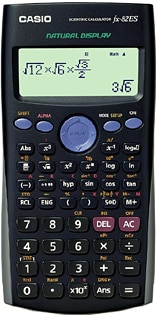
Not Just 2+2 / Review Casio FX82ES


IN THE old days, a scientific calculator meant a log book and a slide rule. By the time I got into college there were a number of brands selling scientific calculators. But the choice was easy, given the number of brands actually available in India.

Two decades later, with global and domestic brands vying for space on retailers’ shelves, Casio has somehow become the brand of choice due to its large range—from the simple calculator to hand-held PDAs that can do graphs. Recently, my inability to use a regular calculator compounded by the loss of my favorite Casio fx100 led me to a stationery shop to buy myself a new calculator.


Casio fx-82ES natural display appealed to me for a number of factors. The first was my love of fractions, the ability to enter an equation in the manner its written on paper was very important. The second reason was its ability to replay or go back and re-edit a calculation and see its impact on the result. The third was, of course, the cost.

After looking at a few models, the decision was clearly not to spend more than Rs 500; and the fx82ES was priced just right at a cool Rs 475. In fact, I was happy buying a Casio, rather than a Flair or Orpat, because my trusted old friend had worked wonderfully well for 20 odd years.

I have been called a show-off for preferring to use a scientific calculator, but, as I said, I am incapable of using a calculator without parenthesis. That’s not the only plus of the fx-82ES. It also lets you see results in the format of a fraction and switch to decimal view at the press of a button.

Another great feature, especially useful for students, is the capability of the fx-82ES to accept and calculate on basis of an array.

The fx82ES has a multi-line 96x31 pixel screen, comes with a hard case, three-year warranty and is very very light. The plastic and the built quality is amazing, and the manual simple to understand. Overall, the Casio fx82ES is all value for money. Go ahead, calculate your benefits.

--
The above article appeared in the Indian Express, on Sunday 15th March 2009

Wednesday, March 11, 2009

My New Tech Toy: Casio FX 82ES Scientific Calculator


I suffer from what may be called Stationery Fetish. I can't resist walking in and buying something from a a Stationery store if I ever cross one. Staples opening in India was something that I always looked forward to, I agree that there maybe stores that have a better variety (Considering Staples is just about starting up here, and since lost on it's direction), but hey, the variety of staplers, pins, pens, and accessories can drive you crazy to spend money.

Another friend of mine, who is in the Textile and Garment Business, who claims to suffer from the same Disease of sorts, has banned himself to go near staples or any other stationery shop, though his collection of pens is enviable, and the post it's he has wow.

Anyway, back to my tech toy. Ever since I went to Engineering School (to do my electronics and datacom), I got hanged on to a scientific calculator. My days of yore involved using a slide rule, but where can you buy one today ?

Casio has made wonderful calculators all through my life of using them from 1990 till now (18 odd years). My biggest problem with standard desk calculators is, they can't do parentheses, and they just can't handle fractions / exponential figures the way I would want to see my result. Though my brother and I can endlessly argue about the reason I would need this format of numbers in business today, but as they say, it's just a comfort zone, and you tend to stay in one.

Anyway, Casio's latest FX82ES available in India now for a list price of Rs. 475, handles a few things marvelously well

1. It has mathematical formula input
2. Handles Fractions as Fractions, results are also in Fractions and in case you want decimal numbers, click of a button can get you these
3. Full editor functionality of editing your formula and or going back in history / replaying the calculation
4. 7 Memories
5. A Large Screen 31 dots x 96 dots (WOW)

For those of you who would want to check out functionality before buying it, you can download the user manuals by clicking here. To know more about the Calculator, visit Casio's website on FX82ES

Sunday, March 08, 2009

Living with iLife


If you are a Mac user, you would want to know about Apple’s utility tool iLife which got upgraded to iLife 09, along with their office suite, iWork, which is now iWork 09.

iLife is a Mac suite of utilities that has four essential multimedia tools that most of us need. A photo management utility called iPhoto, a website builder called iWeb, a music making and rearranging utility called Garage Band and iMovie for moving editing. Now that most of us use digital cameras to take pictures and make movies, iMovie and iPhoto can be handy. So we’ll look at these two tools this week and keep Garage Band and iWeb for another column.

iPhoto 09
When Picasa came out, it made life simpler and Facebook and Flickr made photo tagging fun. But sadly, a Mac had no such tool till iLife 09 came out. iLife 09’s iPhoto allows you to tag faces in the pictures and then it uses a complicated algorithm to recognise faces and sort pictures by faces. It has an accuracy of roughly 90 per cent. And when it gets stuck, it checks with you to see if this is the person you are looking for. The other feature in iPhoto 09 is the ‘geo tag’ for images. That is, you can tag the place where they were taken and then search for photos on the map. The map lets you drop pins for locations and you can mark favourite locations. Other new features allow you to create thematic slide shows and export slide shows as movies and share them on Flickr and Facebook.

iMovie 09
Every time I do an installation for a customer, I use my standard digicam to record a video of the customer talking to me and I keep them for records, hoping that one day I will have enough case studies to make a training file. I could take them to a professional movie editing studio and get them to add titles and other fancy things, but as someone said, if you have a Mac, you could do it all by yourself.

The new version of iMovie 09 lets you add fancy titles. iMovie 09 also features eight new transitions, such as fade-in and fade-out, and 19 video effects, including Aged Film, Sci-Fi, and Cartoon.

If all this is a bother, iMovie 09 has something called Dynamic Themes. Apply the theme and IMovie does the rest for you—adding animated titles and transitions to a movie. My favourite feature here is ‘video stabilisation’. Video cameras now have up to a 400x zoom and it becomes impossible to shoot a stable video at high zoom rates without a tripod. iMovie analyses how much your camera was moving and reduces the camera shake for you. This feature helps to add a professional touch to your home video.

If you want to burn the movie to a DVD, iLife 09 has a tool called iDVD that lets you author DVDs. For a sound track for your home movie, use the Garage Band, or if you simply want to upload it to a web server, use iWeb. For more information on iLife, check out Apple’s website at http://www.apple.com/ilife. In case you already own an Apple, the list price on the new version is $79. Apple India’s suggested retail price is Rs 4,320 plus taxes. You can’t really run iLife on a PC, so if you don’t have a Mac, you must upgrade to one.

--
The above article was printed in the Indian Express, on Sunday 8th March 2009

Sunday, February 08, 2009

Nightmare - Acer Aspire One (AAO) Not Booting / No POST

Shocked / Screwed / ***k, what the ****, why .. why,,,, mar gaya, oh sh~t

That was the expression for me Thursday night. I had to travel to Suryavilas, in the Hills for a meeting, and my AAO (Acer Aspire One), stopped Booting, Switching on at 3AM in the morning. The machine is still under warranty but hey, I had a Train at 7:40 AM in the morning, and knowing the way Acer Handles RMA / Repair, I knew they would take 7 days to even move from their ***. So, what was the option, take my macbook along, or go without a laptop.. after all it was just for a day.. but this tech junkie, could not sleep.. a few minutes of googling around, brought me to a lot of other users making posts on similar problem faced, and then, yahoo (sorry Google), a solution found.

Turns out, this is a Bug with the Firmware, but luckily our friends at Acer, built in a recovery method, not sure if this is legal / legit, and it will not hamper my warranty, but it was the only solution available to me at 3:15 AM

Thanks to *macles, here is the excerpt, of what I did

1. Get a seperate Windows Laptop
2. Get a Thumb Drive (Pen Drive / Memory Stick)
3. Format the Thumbdrive (Dos / FAT Partition)
4. Downloaded the Latest Bios from Acer Taiwan
5. Downloaded UnetBootIn and installed it
6. Ran UNETBootIn with my Thumbdrive connected to seperate (working) windows laptop and made it bootable using FreeDos (see Screenshot below) / remember drive letter maybe different in your case


7. Copied the .fd file extracted (version number will change) to Thumbdrive, and renamed it to ZG5IA32.FD
8. Copied Flashkit.exe (extracted from downloaded bios) to the Thumbdrive
9. Ejected and Inserted the Thumbdrive into Powered off Acer Aspire One
10. Connected Both battery and AC adapter (I had as usual, taken out the battery, tried to switch it on only with AC Adapter, then left everything disconnected for sometime)
11. Press Fn+Esc, keep it pressed and press the power button to turn the AAO on
12. When the power switch light started blinking after a few seconds, released Fn+ESC keys
13. Pressed Power Switch Again
14. Waited Patiently for 5 Minutes
15. Power Button Stopped Blinking (oh my god, yeh kya ho raha hai)
16. Machine Booted, thanked Google, my lucky stars, and Macles
17. Made Sure, I write this Blog Post on my return

AAO, you rock, but hey, if this bug hits, you.. you have the solution here.

G

Sunday, February 01, 2009

Ultimate Music - Review / Bose Wave Music System


The Bose Wave Music System is expensive, but then it’s worth every penny
LAST year, I went to a Bose outlet and reviewed their Wave Music System. But the price tag did not justify writing about it. That was until last week, when I actually splurged and bought myself one, only to be proved wrong in my earlier judgement. Now, I know that if you are a music fan, and would like your music the way it is supposed to be and not reproduced the way your player wants, and don’t want to keep spending on better speakers, amplifiers and so on, then you should also walk into a Bose showroom and do what I did.

I have to accept that Mr Amar Bose has got it right, and no one, trust me, no one, can come even close. If you are a tech junkie, then you may not really be pleased with Bose’s KISS (keep it simple, stupid) principle, but spend half an hour with the system — make sure you take your favourite CDs to the Bose Showroom when you go for the demo and not MP3s — and your opinion will change. The system plays MP3s, but data is lost in encoding such files and they never sound as good as original CDs.
The Wave Music System, has a CD player, plays MP3, and can store six preset FM and 6 preset AM stations. Nothing great you might say. So, what’s the take? What do I like other than the sound reproduction quality?

I love the speed with which it reads CDs, even MP3s, and changes from one track to another. The menu is simple, there is nothing much one can really screw up here — if the music sounds good, how many times are you going to adjust the treble or bass? The FM tuner is great — it is the first one that works inside my bedroom without an external antenna.

The station memory, clock and alarm settings are saved to a crystal clock inside — if you lose power in the middle of the night, it remembers the settings, though the alarm will not play. To add to the effect, the display dims when you turn off the room lights, and brightens as you turn them on. The other fine feature is that you can choose what music or station plays when it wakes you up in the morning. It uses a function called ramp up, which gradually increases the volume of the music, so you wake up gently and not startled out of your sleep.

The system is also child-proof in many ways, as there are no buttons on the player, just an LED panel that displays, time, song title, track and other information, two speakers with Bose’s wave guide technology and a simple slot load CD drive. I also like the fact, that the FM radio supports radio data service, which means that if your channel is transmitting information like station name, song title, artiste and album, the radio will display this in place of the frequency.

It’s not that I like everything about it. At the Bose store they have a stand for the remote control, I wish I had one. The player can’t play OGG, a multimedia container format, files and this is really bad, especially when we are talking about high quality music reproduction. And, I don’t like the fact that you have to pay Rs 7,763 for the iPod dock. But that is about it.

I wanted the silver version of the Wave Music System, but they have stopped producing it — the company now sells just white model (which tends to get dirty fast) and the black one, which I opted for. At Rs 33,638, I think the player is worth every penny.

--
The above article appeared in the Indian Express, on Sunday 1st February 2009

Thursday, January 29, 2009

My New Toy | Bose Wave Music System


Hey, I finally did it, finally fell for it, spent, and bought, a Bose Wave Music System. Watch out for my review in the Indian Express on Sunday, 1st February 2009.

G

Creative Commons License
Writings by Gagandeep Singh Sapra by Gagandeep Singh Sapra is licensed under a Creative Commons Attribution 2.5 India License.
Based on a work at www.thebiggeek.com | www.gagandeepsapra.com | www.g-spot.in.
Permissions beyond the scope of this license may be available at www.thebiggeek.com.